Guest Post: Effects of the SWARM Effect on Total Team Collaborative Learning Results


Our Guest Post comes from Phillip Flamm, who teaches Operations Management in the ISQS department at Texas Tech University. This is his 10th posting on our OM blog.

I have been working with total team collaborative learning (TTCL) for 5 years and the impact it has on student retention and speed of learning. In short TTCL involves the manner in which a team of 3-4 students process lecture material. Step by step:
• Lecture 1…Team covers Lecture 1 notes and compile a cumulative understanding of that lecture which is distributed to all members
• Lecture 2…Team covers Lecture 2 then reviews Lecture 1
• Lecture 3…Team covers Lecture 3 then reviews Lectures 1 and 2
• Lecture 4…Team covers Lecture 4 then reviews Lectures 1, 2, and 3
• One last review of all Lectures before an exam yields good scores

Results have been very, very good. TTCL teams tend to average 15 to 20 points higher on exams than the class (450 students) average.
The SWARM process adds to TTCL:
• Lecture 1….same process as above
• Lecture 2….a member from each team rotates from their team (1) to the next team (2) carrying the cumulative version of Lecture 1. Team (2) combines both documents and then covers Lecture 2
• Lecture 3….different team member from 1 goes to 2 with cumulative Lecture 2. Team 2 reviews both cumulative documents then 2 and 3
• Lecture 4….different team member (1) goes to 2 with cumulative 4 document and so on

The idea is that the movement of cumulative documents/students will make available the notes of 8 students instead of 4. I suspect that the exam scores will be higher than previous TTCL classes, but how much is the question.

The next step in my research is to compare a class with no organized collaborative learning teams to the SWARM – TTCL in terms of exam grades.

Guest Post: An Experiential Learning Exercise for Teaching Line Balancing

Our Guest Post today comes from Brent Snider, senior instructor of Operations and Supply Chain Management at the University of Calgary’s Haskayne School of Business, and Nancy Southin, Assistant Professor at Thompson Rivers University.

Are you looking for an engaging way to teach assembly line balancing to your OM class but leery of the various games that consume significant class time and require the purchase of various materials such as Lego? We have developed a 30-minute experiential learning exercise that can help. It requires only a few minutes of photocopying, and can be done before any lecture content on line balancing is covered.

The exercise features a scenario in which a company is considering re-shoring their laptop production to improve their triple bottom line performance. Student groups are provided the required assembly tasks and then challenged to develop a task assignment that is physically feasible (i.e., satisfies precedence requirements), meets or exceeds expected daily demand, and minimizes the number of employees (stations) required. Groups must submit their solutions for review in front of the class.

Students are motivated to try their best by knowing that their design will be publicly peer reviewed, and also by a food prize for the group that develops the best design. Each submission is displayed on-screen and the class asked “how would this perform?” Through assessing the various submissions, students quickly discover potential pitfalls like exceeding cycle time, out of sequence tasks, and excessive employees. The instructor then facilitates a quick summary discussion, formalizing the “rules” for optimally balancing an assembly line.

Student surveys showed 96% of students recommended continued usage of the exercise and 92% believed the competition taught them how to determine a feasible solution for line balancing problems. Students who learned line balancing though this exercise were also found to have at least the equivalent learning as lecture based learners.

If you are looking for a low admin exercise that significantly improves student engagement when teaching line balancing, then this peer reviewed competition approach is for you. E-mail us at brent.snider@haskayne.ucalgary.ca and nsouthin@tru.ca and we will send you the full lesson plan!


Teaching Tip: What Makes for a Good Professor

In a newly published study (summarized in Faculty Focus, Aug 16, 2017), students were asked to prioritize the instructor qualities that consistently make a difference in how they learn. For those of us just starting a new academic year, it’s the whole list that merits review, self-appraisal and recommitment. The questions for instructors involve the extent to which their teaching demonstrates these characteristics and via what instructional behaviors, policies, and practices they are being communicated. Here are the characteristics, in random order:

Assertive – the teacher has a strong personality, is independent, competitive, and forceful
Responsive – the teacher has compassion, is helpful, sincere, friendly, and sensitive to student needs
Clear – the teacher presents content in ways that students can understand, answers questions, has clear course objectives
Relevant – the teacher uses examples, explanations, and exercises that make the course content relevant to students’ careers and personal goals
Competent – the teacher is a content expert, intelligent, and knows how to teach
Trustworthy – the teacher is honest, genuine, and abides by ethical standards
Caring – the teacher cares about students, understands them, and has their best interests at heart
Immediate – the teacher’s nonverbal behaviors are expressive; the teacher smiles, nods, uses gestures, makes eye contact, and doesn’t speak in a monotone
Humorous – the teacher uses humor frequently
Discloses – the teacher reveals an appropriate amount of personal information when it’s relevant to the topic

Teaching is sometimes described as a gift; some teachers are endowed with it and then there’s the rest of us. But most teachers who are good at what they do have worked hard to get that way and continue to improve and refine their teaching. They take their professional development seriously and believe they can always get better. Further, none of the characteristics on this list is something we were born with. All of them involve learned behaviors that can be demonstrated and communicated in different ways, and no teacher can do them all equally well.

Teaching Tip: Engaging Your On-Line Students

Teaching online is a unique experience for faculty and students. One of those challenges is how to engage online students in activities that push them to go beyond simply reading, interpreting, and interacting. As such, we are constantly seeking ways to engage students in learning that goes beyond the “click-through” material. Here are two ideas from Faculty Focus (Aug. 14, 2017):

Scaffolding the Recording Experience. To effectively engage in online learning that involves interactivity, students need to develop a sense of technology competence. While most tech-savvy students have no problems jumping right in, others may need a scaffolded approach to engaging in online interactivity.
Most LMS platforms allow for the submission of video and audio files to a drop-box, assignment submission folder, or other location for grading within the course. Rather than asking students to record and post a video, you could craft scaffolded assignments that promote real-time connectedness. For the first assignment, you could leverage Instant Messaging (IM) by asking students to work in pairs, sending messages back and forth in a “text-only” interactive session.  Next, students could collaborate using the synchronous video option either provided by your LMS or by a third party (e.g. Skype and Adobe Connect) and submit this work for feedback.

Case Studies. The general procedure of popular case studies is to supply the case and ask the student to respond by answering questions based on the text material. With the addition of technologies like Adobe Captivate or Articulate Storyline (or others), you can prompt students to take actions to move the story forward, select response options with variable feedback, and participate in a way that adds a visual component to the experience. Although somewhat labor intensive, these activities can be used in nearly any LMS and can be reused, edited, and revised as needed. This allows for case studies to presented in a way that calls for interactivity and that is represented in a way that visual cues and information can be displayed to students. Students perceive the experience as a more real-life activity rather than an academic exercise.


Teaching Tip: The First Day of Your OM Class

There’s no discounting the importance of the first day of your OM class. What happens that day sets the tone for the rest of the course. Here are a few novel activities (see Faculty FocusJuly 19, 2017) that emphasize the importance of learning and the responsibility students share for shaping the classroom environment.

Best and Worst Classes –  On one section of the blackboard you write: “The best class I’ve ever had” and underneath it “What the teacher did” and below that “What the students did.” On another section you write “The class from hell” and then the same two items beneath. Ask students to share their experiences, without naming the course or teacher, and begin filling in the grid based on what they call out. In 10 minutes, 2 very different class portraits emerge. Move to the best class section of the board and tell students that this is the class you want to teach, but that you can’t do it alone. Together you and your students have the power to make this one of those “best class” experiences.

First Day Graffiti – Flip charts with markers beneath are placed around the classroom. Each chart has a different sentence stem. Here are a few examples:

“I learn best in classes where the teacher ___”
“Students in courses help me learn when they ___”
“I am most likely to participate in classes when ___”
“Here’s something that makes it hard to learn in a course: ___”
“Here’s something that makes it easy to learn in a course: ___”

Students are invited to walk around the room and write responses. After there are comments on every flip chart, you walk to each one and talk a bit about 1-2 of the responses.

 Behaviors: Theirs and Ours – Put students in groups and have them respond to: “What are 5 five things faculty do that make it easy to learn?” Make a master list to share in class or online. Below the 5 things faculty do, you can also list the 5 things students do that make it hard or easy to teach.

Guest Post: Productivity, Forecasting and Excel with Real Data

Our Guest Post today comes from Howard Weiss, who is Professor of Operations Management at Temple University. Howard has developed both POM for Windows and Excel OM for our text.

I often search the web for real data that I can use for forecasting, and just came across data from Lowes 10 – Year Financial Information report that can be used for both productivity and forecasting.

The report has 5 sections, with 2 that are of major interest to OM. The 1st is titled “Stores and People” and lists the productivity inputs and outputs of: (1)Number of stores; (2)Selling square feet; (3)Number of employees; (4)Total customer transactions; (5)Average ticket.

The next section includes the net sales. I have the students perform several exercises using these data. Here are 5 years of past data.

The Exercises

Exercise 1 – Data integrity:  For each of the years the net sales should be equal to the anticipated net sales (my definition) given by the average ticket multiplied by the number of transactions. Of course, the anticipated and reported net sales are not exactly equal. I ask the students to compute the percentage difference between the reported net sales and the anticipated net sales and also to determine the MAPE differences.

Exercise 2 – Productivity:  For each year, there are 3 productivity measures that can be computed comparing net sales to number of stores, selling square feet and number of employees. Unfortunately, there are no multipliers available to compute the multifactor productivity measures for the 10 years.

Exercise 3 – Productivity change: For all years except the first, I ask the students to compute the productivity change for each of the 3 productivity measures. There is one small issue the students need to recognize. The data is given as most recent first.

Exercise 4 –Graph in Excel: I ask the students to graph the 3 sets of productivity measures. If the students create scatter graphs using the dates in row 3 and the productivity measures that they create in a row below the data then the graph will be fine. If the students create a line graph using only the computed productivity measures then the graph will run backwards. That is, the time axis will be backwards. This is important for the final exercise.

Exercise 5 – Regression/Trend Line – I ask the students to draw a regression/trend line for each of the three measures. I have shown my students that right-clicking on the graph is the easiest way to create the line. I also ask the students to find the three average productivity changes based on the slope of the line in each of the three graphs.

The students very much appreciate applying Productivity to real data, using data that has more than 2 periods and having the opportunity to work in Excel, especially with the graphing capability and regression capability within the graph option.

Teaching Tip: Expanding OM Class Experiences with Virtual Guest Lecturers

“Much of our work as educators,” writes Faculty Focus, “consists of designing and delivering experiences in which students can develop their understanding and application of concepts and skills in our disciplines.” Given that we have only 15-16 weeks with our students, we need various ways for deepening and expanding these formative experiences in operations management. Visiting experts can be a wonderful way of developing expertise, and leveraging online tools like Skype and Zoom can open up powerful possibilities for learning and conversation. One goal is to shrink the distance between the students and the speakers by pulling back the wizard’s curtain between the “expert” and the student.

Skype and Zoom are both great choices for hosting virtual guest speakers. Fear not technology. Just do some test runs, perhaps with consultation from your tech-support staff.

An interview format can be helpful. For one, it requires little preparation time for your guest. This format also keeps the conversation grounded in student’s questions and learning, and it keeps the tone more informal, which is engaging for students. You can prepare students beforehand by having them develop questions based on the work of the expert. Have them then reflect on the guest’s insights following the visit.

Jay, Chuck, and I are also here to help. We are happy to give virtual guest lectures to your classes on almost any topic–or in a Q&A format. Your choice. As you plan your summer or fall syllabi, just drop one of us an email. I am at brender@rollins.edu. Jay is at jheizer@omniglobal.net. And Chuck is at munson@wsu.edu.

Teaching Tip: The Pen Is Mightier Than the Keyboard?

I just came across an interesting research article in the journal Psychological Science that may benefit you and your students. For over two decades, I have wondered just how much attention my operations management students were paying to me during class.

Laptops have been mandatory in Rollins’ MBA classes since 1993. Students were expected to use them for note taking, for Excel exercises, for Powerpoint presentations, and for on-line exams. Were students doing email, were they ordering on Amazon, were they playing poker, Freecell, or Words with Friends? Or, hopefully, were they were taking notes?

For sure, taking notes on laptops rather than in longhand is increasingly common. But according to this article, researchers are now suggesting that laptop note taking is less effective than longhand note taking for learning. Prior studies had primarily focused on students’ capacity for multitasking and distraction when using laptops. This research suggests that even when laptops are used solely to take notes, they may still be impairing learning because their use results in shallower processing. In three studies, the authors found that students who took notes on laptops performed worse on conceptual questions than students who took notes longhand. Their paper shows that whereas taking more notes can be beneficial, laptop note takers’ tendency to transcribe lectures verbatim rather than processing information and reframing it in their own words is detrimental to learning.

Your own observations and thoughts? Feel free to comment!

Source: Mueller, P., & Oppenheimer, D. The Pen Is Mightier Than the Keyboard. Psychological Science, 25 (6), 1159-1168 DOI: 10.1177/0956797614524581

Guest Post: Problem-Based Learning for SPC

bumblauskasToday’s Guest Post comes from Dr. Dan Bumblauskas, who is an assistant professor and the Hamilton/ESP International Fellow for Supply Chain and Logistics Management at the University of Northern Iowa. Dan is also VP at PFC Services, a consulting firm dedicated to helping businesses improve process efficiency. 

If you’re reading this blog I am sure that you, like me, have experimented with and deployed a variety of teaching techniques in OM courses over the years. Today I’d like to share one such initiative I embarked upon a number of years ago: the development of a problem-based learning module for statistical process control (PBL-SPC).  Along with faculty and graduate students from both the colleges of business and education, I developed a web-based simulation in which students immerse themselves in a Frito-Lay factory environment based on Jay, Barry, and Chuck’s cases provided in their textbook.

The motivation for the PBL-SPC was that I found this to be a challenging topic to cover which students often find difficult to relate to and/or boring. Three different poor quality scenarios are provided (crushed chips, stale chips, and poor tasting or nasty chips) and students, as individuals or in teams, must traverse the simulated environment to assess the situation. By “speaking” with the fictitious characters created in the simulation the students get varying perspectives from the manufacturing supervisors for each area of the plant. In addition, some stations have data sets that can be downloaded as MS Excel spreadsheets to be further analyzed using SPC techniques.

Here is the link to the PBL-SPC: https://sites.uni.edu/bumblaud/ where you can access various menu options by hovering over the “Home,” button or clicking on 1 of the 3 scenarios. Under the “Home,” button, you will find the mission statement, production line schematic, staff profiles, an operational overview and a production video produced by Jay and Barry (Pearson) a few years ago.

For more information and materials, such as the team-based rubric created in conjunction with the PBL website, contact me at daniel.bumblauskas@uni.edu or 319-273-6793.

Teaching Tip: Helping Your OM Students Assess Their Progress

studentsFaculty Focus (Feb. 6, 2017) suggests that before midterm exams you enable your OM students to assess their performance and set goals, as well as to ask questions of and provide feedback to you. One way to do this reflective opportunity is through an online journal assignment in which students do the following:

  • Report their overall grade in the course
  • Report their attendance record (when attendance is required)
  • Reflect on their performance, whether it meets their expectations
  • Provide goals for the rest of the course (often in the form of a GPA, but can also be learning outcomes)
  • Provide feedback and ask questions

    Try to do this about a 1/3 of the way through a course so that underperforming students can still change trajectory. They can take 50-400 words to complete the assignment. Their posts range from brief conclusions that they are exactly where they want to be, to detailed descriptions of problems and questions about how to move forward. You won’t grade the assignment, but students will be required to complete it.

    Here’s what you need to know before you implement the progress report assignment.

    • Instructor requirements. (1) Students must have already completed some graded assignments, and (2) they must be able to see the individual grades and understand how they contribute to the course grade.
    • Large classes? This activity would not take long for the tremendous benefit it provides to the class dynamic, student success, and your end-of-semester evaluations, because many reports do not require a lengthy response.
    • Non-tech version. If homework is given through the university’s LMS, it is easy to give an online assignment for this progress report. If you prefer an offline version you can allow students to type or write their progress reports and turn them in during class.

    This small activity can have a big impact on students and on your OM teaching. It also builds strong rapport at critical points early in the semester.

Teaching Tip: Why Students Should Major in OM and IT

data-scientistYou might want to point your OM students (who typically want to major in Accounting, Finance, or Marketing) to a fascinating USA Today (Jan. 24, 2017) article on the “50 Best Jobs in America.” Jobs that require a range of STEM skills (science, technology, engineering and math) claimed 14 spots in Glassdoor’s new survey. This includes the top-seeded position: data scientist, a job in which employs math and computer programming skills to wrestle huge amounts of raw data into intelligible and useful data sets. That job took the crown with a leading Glassdoor score that reflected the number of openings for the position (currently 4,184), a top company satisfaction rating (reflective of culture and values) and a healthy median base salary ($110,000).

Here are some others that share skills we teach in operations management:

#2 DevOps Engineer (2725 openings, $110,000 salary); #3 Data Engineer (2599, $106,000); #5 Analytics Manager (1958, $112,000); #7 Data Base Administrator (2977, $93,000); #18 Supply Chain Manager (1270, $100,000); #22 Quality Control Manager (2531, $92,000); #42 Operations Manager (1009, $93,000); #45 Supplier Quality Manager (862, $80,000); #50 Construction Project Manager (1944, $85,000).

The proliferation of technology-related jobs is due to those skills now being needed at businesses that don’t consider themselves traditional tech companies. These days, almost every company is in some way a tech company, requiring workers who are able to create and maintain a firm’s technological infrastructure. “Any company with data today is trying to get these people,” says Glassdoor’s chief economist. “The problem in filling these positions is that generally employees’ skills have not kept up with the demand.”

Teaching Tip: The Steep Price of Bottled Water

Indian fishermen pushed their boat through plastic waste last month in Mumbai.

Almost all of our students are interested in and concerned about helping to save our planet. So when you cover the subject of Sustainability in Supplement 5, here are some facts that may lead to a lively discussion (from The New York Times–Nov. 1, 2016).

  1. For the first time, bottled water is expected to outsell soft drinks in the U.S. Some 49.4 billion bottles of water were sold here last year, and each is having an effect on the environment.
  2. More than 1/2 of Americans drink bottled water, despite the fact that tap water is free and is generally of very high quality.
  3. Producing a bottle of water uses about 2,000 times as much energy as producing an equivalent amount of tap water.
  4. Most bottles are thrown away after a single use. In the U.S., less than 1/3 are collected  for recycling, even though the plastic in bottles is easy and efficient to recycle. Most plastic waste makes it to recycling facilities or garbage dumps, but a lot ends up in our rivers and lakes.
  5. Eight million tons of plastic end up in the ocean every year globally. (As much as 100 million tons of plastic is already floating there, with nearly 1/2 of that from China, Indonesia, the Philippines, and Vietnam).
  6. Environmentalists suggest cutting off the supply at the source now–through better recycling and drinking less bottled water.

In Supplement 5, we discuss sustainability as a matter of corporate social responsibility (CSR). But here is a fun 3-minute on-line quiz designed to measure an individual’s measure of bottled water consumption and social responsibility: nytimes.com/science.

Teaching Tip: Our New Inventory Management Simulation

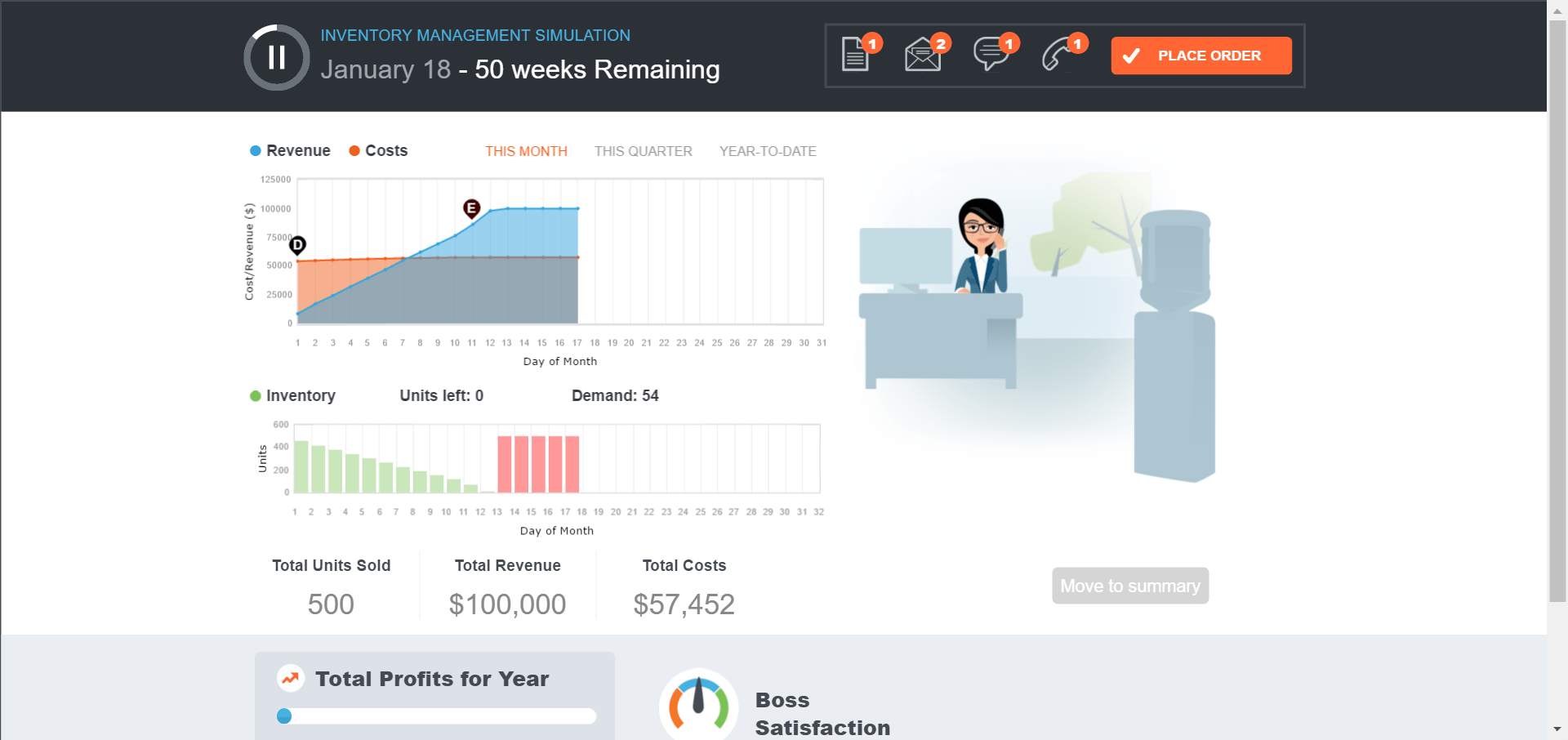
Inventory Simulation is the 4th of our four new classroom gaming exercises. It accompanies Chapter 12, Inventory Management and is free within our MyOMLab learning system.

Goal: Manage stock of electronics device to minimize costs and maximize profits.

You are the store manager at a local branch of DigiLife, a large electronics retail chain. A new version of a popular consumer electronics device called the Amulet is coming out this year. It is your job to sell as many Amulets as you can while minimizing your costs in order to maximize your store’s profits.

Learning Objectives

Primary Objectives:

  • Understanding how EOQ is calculated
  • Understanding the limits of EOQ

Ancillary Objectives:

  • Use EOQ formula = sqrt(2ds/h)
  • Where d = qty demanded, s = ordering/setup cost, h=holding cost
  • Understand what the answer means and what the inputs mean.
  • Knowing how EOQ can help guide you towards better decisions about order size and time between orders.
  • Understand that demand is variable (Sales/marketing give you their best forecast but no one can predict the future. Also, you may be given an average demand where actual demand will fluctuate from day to day.)
  • Understand that h has fixed and variable components (if you already have a fridge you might as well fill it. But if you’re paying for storage by the square foot, that’s going to vary).
  • Understand ordering costs aren’t always obvious (going to the gas station every day to top off your tank doesn’t mean you may more for your gas, but it’s a huge waste of time).
  • Understanding the economic impacts of defects and damage, stockouts and rush orders.
  • Understanding the limitations of using EOQ to guide your decisions–that EOQ doesn’t give you an exact answer, but it gets you close.
  • inventory simulation

Teaching Tip: How Microsoft Sells Supply Chain Management and ERP

ms scm graphicHere is proof that SCM has turned into a field that every student needs to understand. The following is from Microsoft’s web site called the Dynamics of SCM, which promotes its product, called Microsoft Dynamics ERP :

Supply chain management is the oversight of the entire lifecycle of a product or service: from its infancy as a raw material or idea, to the manufacturing of the product, to its distribution, to the retailer, and then ultimately, to the consumer. Each of these stages of the product or service is a link in a chain. Each step is fastened to the next, interconnecting to facilitate the creation of a product.

Maintaining a holistic view of your supply chain activities is essential for efficiency. You need to be able to examine your business—every inch of it—in real time. To have supply chain control, you need to know what’s going on at every stage, at all times.

An enterprise resource planning (ERP) solution will provide you the control of your supply chain you need for more efficient people and processes, better costs, happier customers and greater profits.  This automation helps reduce redundant tasks and can increase accuracy, all the way to your customer’s receiving dock. That can eliminate bottlenecks, improve order processes, and minimize both handling time and overhead.

ERP gives you the ability to find exactly the information you’re looking for so you can make smarter decisions more quickly.

  • Simplify critical purchasing and receiving processes.
  • Know what your customers want.
  • Keep inventory lean and still address demand.
  • Tools to make smarter buying decisions and to negotiate better terms.
  • Help improve customer service and improve customer relationships.

Teaching Tip: Our New Quality Management Classroom Simulation

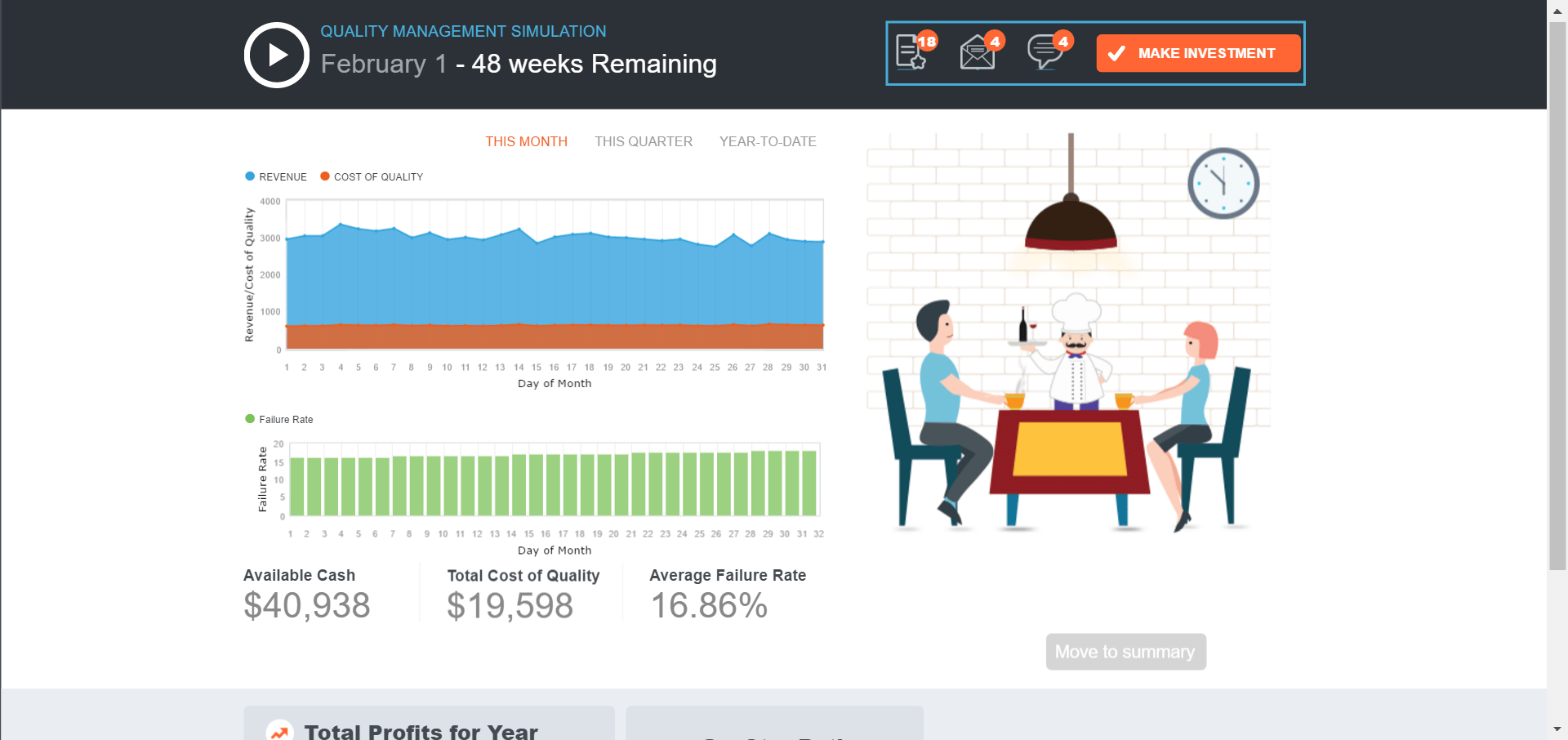
Quality Management Simulation is the 3rd of our four new classroom gaming exercises. It accompanies Chapter 6, Total Quality Management, and is free within our MyOMLab learning system.

Goal: Make quality investments with good ROI in terms of profits and customer ratings.

You are the manager of Cibare, one of the hottest Italian restaurants in town. You manage a full service staff and work closely with the Chef and the restaurant owner to ensure Cibare is providing a high-quality experience for customers. It is your job to make sure daily operations are running smoothly and that the investments you make to improve or maintain quality provides a return that exceeds the cost.

Learning Objectives

  • Understand that quality is an investment. There is a cost to investment and often a return. When managers allocate resources appropriately, the return on an investment should exceed the cost.
  • Understand that quality is a continuous pattern of activities and not a one-time event.
  • Develop a more complete understanding of total cost concepts.
  • Help the student realize that exact numbers and are not always available as on an exam and acknowledge that outcomes have uncertainty associated with them and that decisions must be made with imperfect information.

    Industry: Food service/ Hospitalityquality simulation