Guest Post: Student Perspectives on the MyOMLab Project Management Simulation

Wende Huehn-Brown is Professor of Supply Chain Management at St. Petersburg College in Florida. She continues her review of our five OM simulations.

This post will focus on the Project Management simulation which uses a construction industry scenario. (My post last month looked at the forecasting simulation).The majority of students felt this simulation reflected how things likely worked for a project manager, even finding the pressure to perform engaging and realistic.

Students get immersed in planning needs and quickly learn decisions cannot be focused on profit entirely to achieve customer expectations. Making decisions and seeing the consequences of those decisions was viewed a valuable learning experience. The process of evaluating feedback is practical and several students reflected the need to better plan their life similarly!

Students often see many job opportunities in project management. This simulation gives them an appreciation for what they do, as well as how unforeseen circumstances beyond their ability to control are likely necessitating attention back to their critical path. One student even commented that he now understands his own need to be more flexible adjusting plans at home.

In this simulation, half of the students said they completed the simulation more than once as they felt motivated to better master the lesson. Students often mentioned their ‘light bulb’ moment was when they discovered they did not plan enough slack early in the project. Learning that trying to offset plans around natural disasters and other issues was much harder to fix later in the project.

About 30% of the students mentioned using Excel to plan and track progress. They found the simulation a great extension, building upon what they learned in the study plans and other MyOMLab assignments. While many found this virtual simulation challenging, the majority of the students felt enlightened and appreciated the opportunity to test their project management skills.

Guest Post: Student Perspective on the MyOMLab Forecasting Simulation

Wende Huehn-Brown is Professor of Supply Chain Management at St. Petersburg College in Florida.

This post is a followup on my prior Guest Post (April 15, 2019). Today, I would like to share my students’ perspective on the forecasting simulation in MyOMlab. It deals with the retail industry as operations consultant. The students enjoyed this because of their own experiences in retail and as customers.

I teach this class online and having further online resources in MyOMlab to enable student learning is great! Sure, I have hundreds of pencasts and tutorials on doing the analytics, but the simulations are a practical approach to learning the lessons. Do you remember using a graphing calculator? I don’t, so was surprised to have 40% of the students talking about that old forecasting method! They also commented on how they learned to use ExcelOM and found it more accurate and faster with less steps.

Not only does the simulation provide students with further insight on applying the lesson and using technology for analytics, but also the events that happen during the simulation are realistic. Many of my students commented on connecting this simulation to the real world was quite enlightening to consider how the events may affect supply and demand–such as how external conditions can affect market prices.

They also got quite excited when they saw their accuracy improve, even to 0% error. If you can keep the MAPE relatively low, you even get a $10,000 bonus in the simulation. 60% of the students commented on how this imaginary bonus helped to motivate them and keep them focused on achieving the 10% MAPE goal. I guess even in a simulation incentives are motivating!

Students enjoyed how the simulation made learning fun. Several students commented how they want to plan more time to do it again to further improve. One student reflected on a on a key lesson he learned regarding wasting time with non-algorithmic solutions. The simulation showed him to have more faith in his spreadsheet modeling skills.

Video Tip: 12 New Videos Your OM Students Will Love

Kimberly Gersh, a recent Elon U. grad, talks about her job as a project manager

We are very excited to share with you the newest feature of the text editions that have just been published–12 two-minute videos of recent college grads talking about their new jobs in operations management. These videos are found in MyLab Operations Management and can even be assigned, as each has 2 multiple choice questions attached. The articulate young people presenting can help motivate your own students. And they even each provide tips for how to be successful in the job market and career. Here they are:

Ch. 1: Jeremy Knowles with Genesis Financial Solutions (Washington State U. grad), talking about productivity

Ch. 3: Kimberly Gersh with Little Green Software (Elon U.) on project management.

Ch. 4: Kenzie Schmitt with Coral USA (York College) on forecasting.

Ch. 5: Ari Davis with Soil Co. (Rollins College) on product design.

Supp. 6: Kylie Bertoncello with Siemens Energy (U. Central Florida) on SPC.

Ch.7: Cameron Tinney with BIMBO Bakeries (Niagara U.) on process analysis.

Supp. 7: Gabrielle Sliwinski at Covestro (Robert Morris U.) on capacity planning.

Ch.8: Greg Friedman at JCR Companies (U. Florida) on location analysis.

Ch. 9: Megan Jones at Textron (York College) on facility layout.

Ch.11: Nicholas Kostner at Kryton (U. Northern Iowa) on SCM*.

Ch. 12: Nicholas Delmonico at UMPC (Robert Morris U.) on inventory management.

Module G: Charlie Render at Shutterstock (U. Florida) on data analytics.


Note that I placed an asterisk after Mr. Kostner’s video. All of these short presentations are excellent, but the candor exhibited in this particular one will leave your students with a lasting impression. Please watch a few (or all) and you may very well decide to share these with your classes. (The videos are found in the Multimedia Library, as well as in the Instructor’s ToolsAssignment Manager).


MyLab Operations Management: Some Important Features–Part 2

Today, we would like to tell you about a few more features of MyLab Operations Management that you may not be aware of: (1) the Test Bank; (2) Learning Aids; (3) Learning Catalytics; and (4) the Instructor’s Resource Page.

Test Bank: With about 4,000 questions, ranging from multiple choice to short essays to mathematical problems, out Test Bank allows you to mix and match types of questions, including questions about the video series, OM in the News, etc. Questions can be scrambled so students see differing versions–or you can add your own favorites to the system.

Learning Aids: When students are trying to answer a homework problem and they run into a roadblock, they can turn to “Question Help” once you have activated that MyLab feature. Four help options will be available: (1) E-text will take them to the proper page in the book to review: (2) Videos of similar problems being solved by the authors may be selected; (3) the “Ask my Instructor” button emails you (or your TA)  a screen capture of the problem, with the data the student has entered, along with the student’s comment; and (4) “Help me solve this” provides a similar problem, with step-by-step help as the student walks through the problem.

Learning Catalytics: Do you remember the old system called “clickers” allowing students to buy a clicker for use in answering questions you pose in class? MyLab includes this feature free, where students can use their cell phones or laptops to respond. This is a popular tool that increases active learning. We provide 100’s of pre-written multiple choice questions, or you can create your own.  (You find this feature under “Course Home”‘ the scroll down to “enrich your Course”).

Instructor’s Resource Page: When you click on “Instructor Resources”,  select “What else do you need”, for our invaluable Instructor’s Resource Manual, all the Powerpoints, the Solutions Manual, Test Item files, and 3 Excel-based games for class use.

MyLab Operations Management: Features You Will Want to Explore in Class–Part 1

Jay, Chuck, and I were just talking about how powerful our MyLab learning system has become over the past five years, when we figured out that even we had trouble listing ALL of the newer features! With over half of our OM text’s 500+ adopters now using the platform, its time to layout the options. So here is Part 1 (of 2):

Simulations: We have 5 gaming simulations: supply chain management (Ch.11); inventory management (Ch. 12); quality control (Ch. 6); forecasting (Ch. 4), and project management (shown on left, Ch.3).  They have turned out to be one of the most popular and powerful tools and are fully assignable through MyLab Operations Management. Students can complete them as homework or work on them as an in-class activity, individually or as part of a team. The simulations are real-world and easy to use.

OM in the News Feature: Each chapter has a new OM in the News reading (just like the ones provided in our blog). These short readings have links to the full article (in Businessweek, NYT, WSJ, etc.), along with 4 multiple choice questions you can assign to assure students have read the piece.

Company videos: Perhaps the most widely used feature is the series of forty-one 6-12 minute videos of companies we feature in the text. We created each of the videos to match exactly with chapter topics and feature companies that we hope students can relate to (Hard Rock, an NBA team, Frito-Lay, Alaska Airlines, and so on). You can show the videos in class or assign them, as each has 4 multiple choice questions in MyLab Operations Management.

Solved Problem Videos: Each of the 89 Solved Problems at chapter end has a 3-20 minute video we created to walk your students through the solution, step-by-step. We call them Virtual Office Hours.

Concept questions: To help ensure that students are reading the text material, we have created 4 multiple choice concept questions for each major heading in the book. You can assign a few for the topics you cover and use them to reinforce learning or as a pretest for the chapter.


MyOMLab: MyOMLab Enhancements for Fall

We are pleased to announce a new way this fall to navigate MyOMLab and gain deeper insight into student performance. The changes will reduce the time it takes to set up and navigate MyOMLab. We have also enhanced the eText experience for your students. A quick summary of updates follows (click here for more details):

New Instructor Home: The Instructor Home simplifies MyOMLab navigation. It’s comprised of four tiles: 1. Welcome 2. Gradebook 3. Assignments 4. Enrich your course.  Each tile has direct links to the most highly utilized features for course administration, so you can get where you need to go in one click.

Welcome tile: The first tile provides general administrative options including: ● Current course time zone ● Standard/Coordinator settings ● Announcements.  The Welcome Tile also allows you to return to whichever MyOMLab screen you last visited.

Gradebook tile: With one click, you are able to access the most highly used gradebook management features including: ● Send email reminders for students to complete assignments ● Manage gradebook ● Manage incompletes ● All assignments results ● Change weights

Assignments tile: Similarly, you have instant access to the most highly utilized assignment management features including: ● Manage/edit assignments ● Settings for multiple assignments ● Individual student settings

Enrich Your Course tile: The final tile allows you to easily discover and implement teaching and learning features that meet the needs of your course. The Enrich Your Course page, accessed from the instructor homepage, provides you with an overview of some of the most important features and a guide to get started using these features quickly.

New student performance analytics: Performance analytics will allow you to have a quick glance of the overall course performance, or the ability to click on a name to drill down on an individual student performance. Accessed through your gradebook, performance analytics give you an easy way to engage directly with students based on insights.

eText Enhancements: The eText update includes: ● Syncing of notes across all devices ● A new look for the table of contents ● Faster load times ● Improved browser compatibility ● Access to the new eText Notebook


MyOMLab: New Features for Spring 2018 Semester

Here are some of the features we have just added to MyOMLab (click here for details):

A Tool to Deepen Student Learning. With the December 2017 release, you now have an additional way to assess their students by creating short-answer essay questions in homework assignments. These short-answer essay questions allow students to demonstrate their critical thinking, reasoning, and decision making skills. They are flagged for manual grading.

Replace Questions in Assignments with Results. After assignments are given, and students have started working, you may sometimes find the need to edit the assignment. Prior, you have had the ability to remove questions after students have submitted results. With the December release, you now can replace questions after results have been submitted. Simply select the question you wish to remove from the assignment and replace from available questions.

LMS Grade Sync Following Student Results. The new release enables you to change LMS grade sync settings for individual assignments after students have submitted results. This enhancement, being moved to the Change Weights & Grade Sync Settings page, will make it easier for you to manage LMS grade sync settings.

Our eText is now available on Mobile Phones. The update offers enhancements to the eText to provide a more mobile-friendly and accessible experience for students. They can access eText and read how they want: anytime, anywhere, even offline. Students can also ● Track exactly what they need to study by creating notes and highlights ● Learn with interactive images, videos, and animations (available with select titles) ● Search for content.

New “Date Started” Column in Student Results.  Instructors now have insight into when each student began working on assignments.

Teaching Tip: Unlocking the Promise of Digital Assessment with MyOMLab

For many profs, student assessment is one of the most labor-intensive components of teaching a class. The work continues as the tests are scored, papers read, and comments shared. Performing authentic and meaningful student assessment takes time. Consequently, some instructors construct relatively few assessments for their courses.

Unfortunately, this practice limits our ability to reliably assess student learning. If a course grade is a mosaic, then each assessment is a tile. A mosaic with just a few tiles only presents a part of the picture. “We can improve the quality of our assessment mosaic by increasing the number of performances we assess,” writes Faculty Focus (Oct. 30, 2017). These smaller and more frequently administered snapshots of student learning are called “formative assessments.” The integration of frequent formative assessments improves the validity of course assessment and has been demonstrated to have a variety of benefits, including improving student achievement and helping students develop more agency over their own learning.

Our MyOMLab assessment tool allows for automatic grade responses to algorithmic homework and test questions, to multiple choice questions, and to video and OM in the News questions. In addition to simplifying formative assessment, the use of this tool has been shown to amplify student engagement. Tech-enhanced formative assessments produce actionable data that can help students learn more efficiently. (MyOMLab also automatically calculates means and medians for every assignment and exam, and, in fact, metrics for every question are summarized, including number who attempted it, number correct, number with partial credit, number incorrect, and average time spent. Plus, that information can be retained in the MyOMLab system for several years as long as the course hasn’t expired yet).

Over 60% of our text adopters have implemented MyOMLab into their OM courses. It’s easy to do (learning takes less than an hour) and Pearson’s reps are always available for one-on-one training. Here is a link to locate your local Pearson representative:  http://www.pearsonhighered.com/educator/replocator/.

MyOMLab: Improvements for Fall–Part 3

Here are four more upgrades we have made to MyOMLab for Fall 2017Click for details

OM Simulations Each of these 4, self-contained simulations help students employ critical thinking and analysis to make OM decisions in realistic business contexts. From inventory management for a new tech product to forecasting fuel consumption, students gain valuable exposure to how OM works in the real world, learning key course concepts as they go. Topics Include: Inventory Management, Quality Management, Project Management and Forecasting. (If you are one of our over 500 adopters who is still not using MyOMLab, this one feature alone makes the learning system worthwhile!)

Automatic Grade Sync for Canvas  MyOMLab instructors who have integrated their courses with Canvas have the option to select automatic grade sync, allowing for a seamless way to sync grade data between MyOMLab and their LMS. Automatic grade sync saves time for instructors by transferring grades completely touch-free, eliminating the need to manually transfer grades. Instructors have the option to select all assignments or specific assignments to automatically sync.


Dynamic Study Modules (DSMs) DSMs provide students personalized assistance by continuously assessing their activity and performance in real time. Summer 2017 updates introduce a student dashboard and expand instructor reporting capabilities, giving faculty easier insight into student, and class, mastery of concepts. Five new DSM reports and dashboard views provide instructors with the following: ● A high-level summary of a class’ aggregate performance ● Information on topics where students tended to answer questions incorrectly, but with a high degree of confidence ● An in-depth view into the activity of students who continue to answer questions incorrectly ● Insight on student progress towards completing assigned DSM activities ● Details on student’s specific performance.

MyOMLab Plus Portal Update The overall look and feel of the MyOMLab Plus Course Portal is being refreshed to give instructors a more modern, clean, and user-friendly experience. Improvements have been made to the MyOMLab Plus Portal to allow for easier course organization and management.

MyOMLab: Improvements For Fall–Part 2

Here are five more upgrades we have made to MyOMLab for Fall 2017. Click for details

My Course Portal Updates Instructor access to information about courses in the My Courses Portal has been improved! Updates include a refreshed forgotten username/password screen and visible listing of third-party LMS partners. Instructors will also now have the ability to create categories for improved organization and a shortcut for easier access to member sections of coordinator courses via the new pin/unpin functionality.

Shortcuts to Nested Courses Instructors will now have the ability to create a shortcut for easier access to member sections of coordinator courses on the My Courses Portal home page via the new pin/unpin functionality. This functionality is available in both the tile and list view.

Assignment Manager Updates The Assignment Manager is now easier to navigate. The ability to filter assignments by type and “Set Prerequisites” have been nested within drop down menus, and “Individual Student Settings” has been moved to the menu bar.

Gradebook Updates Updates to the options available when managing roster, managing incompletes, and the ability to show/hide class metrics allow instructors to easily access and navigate to the student performance data that’s important to them.

Improved Accuracy of Time-Spent Values Homework assignment inactivity alerts have been reduced from 60-minutes to 30-minutes. If the user does not respond to the alert within 5 minutes, the assignment will be saved and closed. In addition, a 30-minute alert has been added to media assignments. Inactivity alerts will reduce large time-spent values and increase the ability for instructors to track time-spent more accurately.

More to come!

MyOMLab: Improvements For Fall–Part 1

The MyOMLab Summer 2017 Release increases levels of customization and flexibility for instructors for in-progress assignments and simplifies the teaching and learning experience with ease of use updates. Here are 4 changes--click for details. More to follow over the next few days!

Improved Organization Both students and instructors can personalize how their MyOMLab courses appear on the main portal page by creating categories to group and sort courses/products. Users can create categories to group courses by semester, discipline, or any other organizing structure: (1) Users can create, remove, rename, or move, categories in the My Courses Portal; (2) Categories can be created on all page views: Active, Inactive, and Nested; and (3) After setting up categories, they will be visible with expand and collapse options.

Increased Customization of Assignments MyOMLab instructors will now have even more flexibility to edit homework assignments. Instructors are able to modify in-progress homework assignments and remove questions even after students have already completed and submitted the assignment. You simply select the “Remove Questions” option within the “Actions” drop down menu. Questions removed from an assignment will become unavailable for students to access. All students, regardless if they have submitted results or not, will automatically receive full credit on removed questions. After the question is removed, it will remain visible but appear struck-through within the assignment manager.

Late Submissions and Penalties for Quizzes and Tests Updates to assignment settings allow for instructors to have even greater control and flexibility when creating quizzes and tests. Instructors may configure quizzes and tests to allow for student submissions past the due date and set a late submission penalty. Within quiz and test settings, instructors may allow students to work and submit after the due date. Instructors have the option to deduct points from a student’s score for late submissions. If a student begins a quiz or test after the due date, the student will be notified of the penalty for the late submission prior to beginning the assignment.

Assignment Manager Updates  The Assignment Manager is now easier to navigate. The ability to filter assignments by type and “Set Prerequisites” have been nested within drop down menus, and “Individual Student Settings” has been moved to the menu bar.

MyOMLab: Updates to LMS Integrations and My Courses Portal

LMS INTEGRATION UPDATES: Our Learning Management System (LMS) integration services give you easy access to the MyOMLab from your existing LMS. Access to change weight and other grade sync settings are now more easily accessible for instructors using third-party LMS integrated courses. On the Gradebook Landing Page toolbar, third-party LMS Integration courses will see “Change Weights & Grade Sync Settings” rather than “Change Weights” as in standard MyOMLab courses. This menu option will allow instructors to select grade sync settings for both overall scores and specific assignment scores.

MY COURSES PORTAL UPDATES:
mylab-update-2Updates have been made to steer instructors quickly to the correct course with a more streamlined process for copied courses and coordinator/member courses.

  • The My Courses Homepage provides a better user experience for instructors. The clickable area to access a course has been expanded, the interface streamlined, and  the course ID is now able to be copied from Title and Course views.
  • Accessing and managing Coordinator and Member courses is now even easier. Instructors with Coordinator and Member courses can now directly access their Coordinator Courses on the Portal Homepage by clicking on the course title for the course. To access Member courses associated with a Coordinator course, instructors can click on the Active Member section links.
  • The copy a course process has been streamlined to better delineate Instructor Courses from Coordinator Courses. Additional informational text has been added to differentiate course characteristics between Instructor Courses and Member Courses.


MyOMLab: Instructor Gradebook Updates

myomlabWe are pleased to announce that, over the winter break the MyOMLab Gradebook has improved navigation among frequently-used Gradebook features, making student performance insights more readily-accessible and providing even more flexibility in grading and assignment settings.

 The Landing Page: This has moved offline items to the main toolbar(1) and now offers a direct link to the Reporting Dashboard, improving the visibility of advanced reporting capabilities.(2) The landing page also includes a performance graph(1) that highlights student and class performance. A new dynamic search box(2) allows instructors to easily find a specific student’s results. The new landing page enables instructors to quickly see class performance by grade categories. The landing page also includes the most recent student login information(3).mylab-update-1

Contacting Students with Specific Criteria:  Searching for and emailing students based on specific criteria has been streamlined with “Email Selected” and “Export Selected” buttons now on the search results page. Search results can also be accessed from the Gradebook landing page by clicking the bar in the chart that represents the score range of interest–e.g., 40-50%.

Filtering of Change Weights: The change weights page includes new filtering functionality by assignments and chapters makes selecting individual assignments or chapters easier.

Add/Edit Student ID: The menu item for Add/Edit Student ID was removed from the toolbar header and added as an option in the “More Tools” dropdown menu. Also, the new Edit Roster menu has been updated to present Add/Edit and Upload Student IDs.

Guest Post: MyOMLab and Partial Credit

howardweiss2Our Guest Post today comes from Howard Weiss, who is Professor of Operations Management at Temple University. Howard has developed both POM for Windows and Excel OM for our text.

I have used MyOMLab with the Heizer/Render/Munson text for over 6 years now. One option on assignments in MyOMLab is to “Allow partial credit on questions with multiple parts.”  In other words, a student does not need to get every part correct on a question to receive credit. This is only one aspect of partial credit and because I use MyOMLab for exams I need to allow for other types of partial credit.

For example, I commonly see students making these mistakes:  Forgetting the initial inventory in aggregate planning;  Maximizing instead of minimizing in LP;  Entering the service time instead of the service rate in waiting lines;  Not converting one time unit to another in line balancing;  Not converting months to years in inventory; Not multiplying by the cost per unit in layout.

For some of these mistakes, all answers would be incorrect and MyOMLab would give the students a zero for each problem. When I used to grade exams by hand, I would typically identify the mistake and give the student partial credit on the problem.

I now tell the students that they must save all of their work on the problem, which in my case is an Excel file. I encourage the students to review their exam results and to send me an email if they think they deserve partial credit on the problem. They must include their original Excel file with the incorrect work so that I can see that it matches the answer they entered into MyOMLab, an explanation of the mistake that they made, and the correct way to solve the problem. I typically give half credit on the part of the question for students who successfully do this. Many of my students take advantage of this option. They, of course, want the exam points and, I, of course, want them to learn from reviewing the exam.

Teaching Tip: Our New Inventory Management Simulation

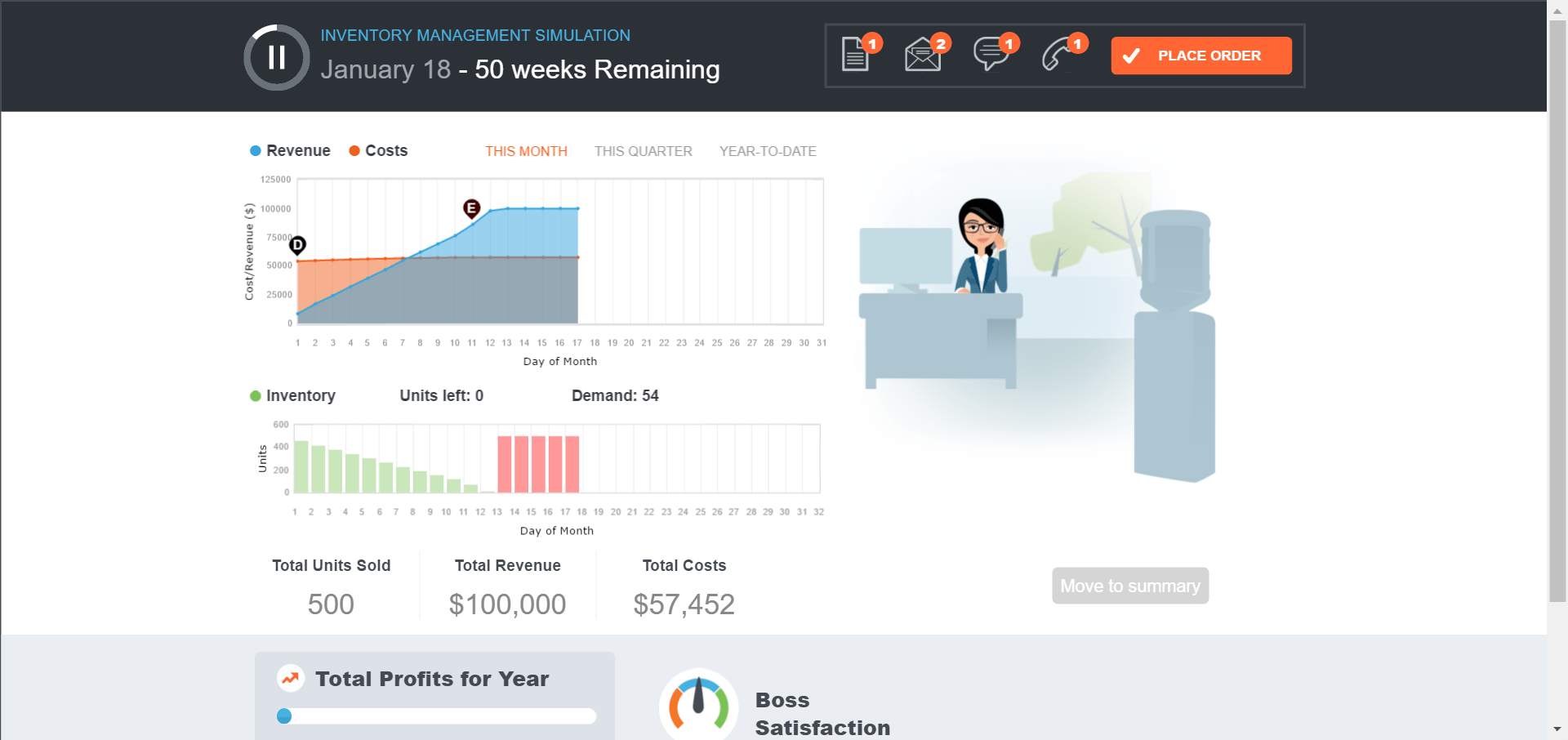
Inventory Simulation is the 4th of our four new classroom gaming exercises. It accompanies Chapter 12, Inventory Management and is free within our MyOMLab learning system.

Goal: Manage stock of electronics device to minimize costs and maximize profits.

You are the store manager at a local branch of DigiLife, a large electronics retail chain. A new version of a popular consumer electronics device called the Amulet is coming out this year. It is your job to sell as many Amulets as you can while minimizing your costs in order to maximize your store’s profits.

Learning Objectives

Primary Objectives:

  • Understanding how EOQ is calculated
  • Understanding the limits of EOQ

Ancillary Objectives:

  • Use EOQ formula = sqrt(2ds/h)
  • Where d = qty demanded, s = ordering/setup cost, h=holding cost
  • Understand what the answer means and what the inputs mean.
  • Knowing how EOQ can help guide you towards better decisions about order size and time between orders.
  • Understand that demand is variable (Sales/marketing give you their best forecast but no one can predict the future. Also, you may be given an average demand where actual demand will fluctuate from day to day.)
  • Understand that h has fixed and variable components (if you already have a fridge you might as well fill it. But if you’re paying for storage by the square foot, that’s going to vary).
  • Understand ordering costs aren’t always obvious (going to the gas station every day to top off your tank doesn’t mean you may more for your gas, but it’s a huge waste of time).
  • Understanding the economic impacts of defects and damage, stockouts and rush orders.
  • Understanding the limitations of using EOQ to guide your decisions–that EOQ doesn’t give you an exact answer, but it gets you close.
  • inventory simulation